

I use Workspace to run my entire business. That includes storing and sharing video projects I’m working on for my YouTube channels and other projects.
As you likely know, Google Docs, Sheets, and Slides all have version control built-in. A viewer is always seeing the most recent version of the file without you needing to reshare it, and the changes are stored in ‘version history’ within the file itself.
However, if you’re working with any different file format, like PDFs, audio, video, and the myriad of other types, you might find yourself deleting the original file, uploading a new one, then having to reshare the link.
Managing versions properly means the sharing link stays exactly the same, and a viewer will see the latest version when they access it.
How to manage your file versions
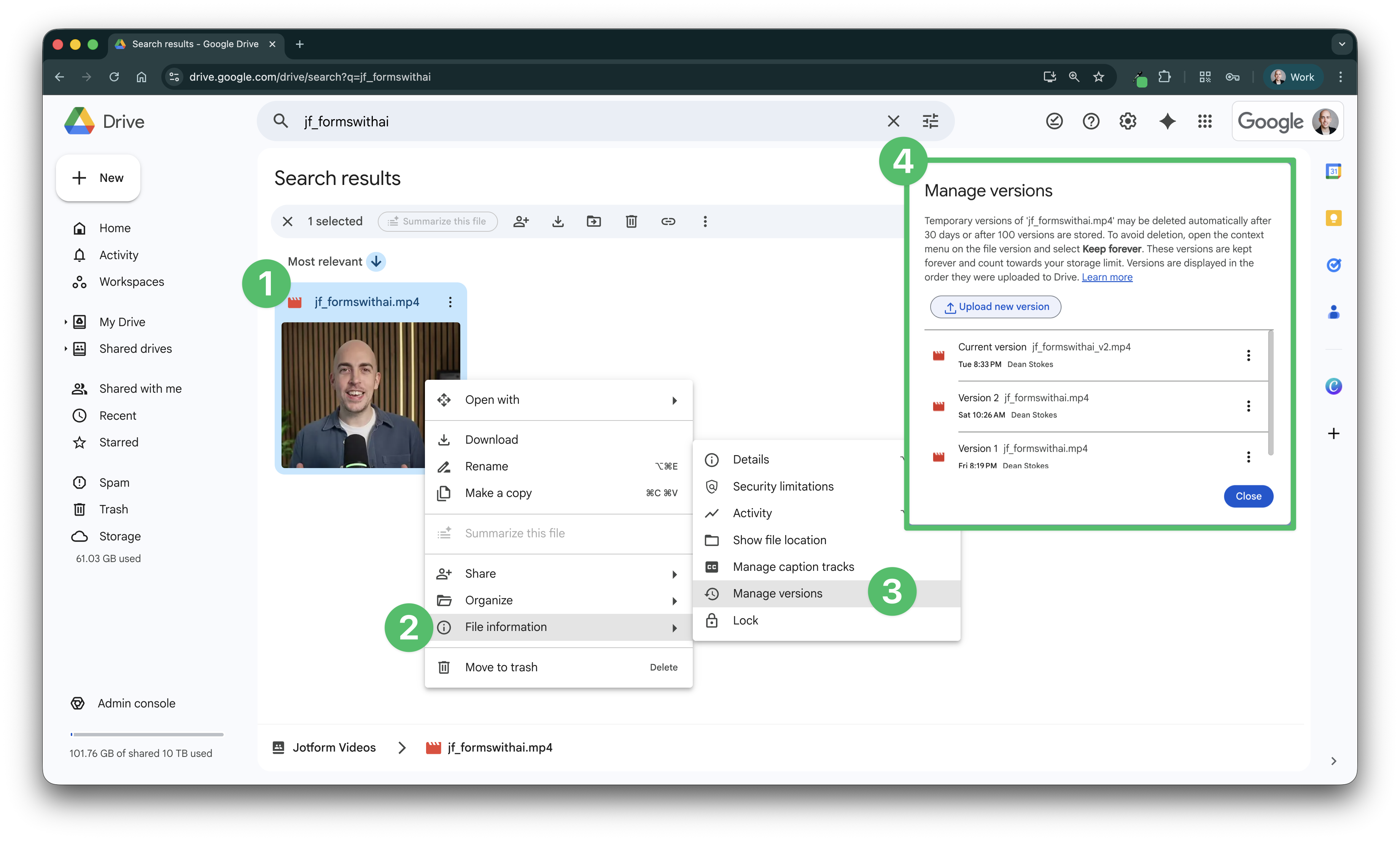
Here’s how it works, using a video file as an example:
- Find the original file in your Drive
- Right click and go to ‘File information’
- Choose ‘Manage versions’
- Click ‘Upload new version’
That’s it! You’ll see all prior versions in the list, and can click the three dots to download them
Any questions, or something you’d like to see covered in a future newsletter? Click reply or let me know in the comments.
See you in the next one!
Dean