

Whether you’re using generative AI to help with work every day, or are still just dipping your toes in the water, you probably haven’t tried this yet.
Gemini can see and understand all kinds of different inputs - not just text. That means you can sketch something and then bring it to life.
Perhaps you want to create a new one-page website for your business or product? Maybe you have an idea for new web based app? Or need to design an email layout?
Read my example conversation to get an idea, then follow the steps below to try for yourself.

How to bring your scribbles to life
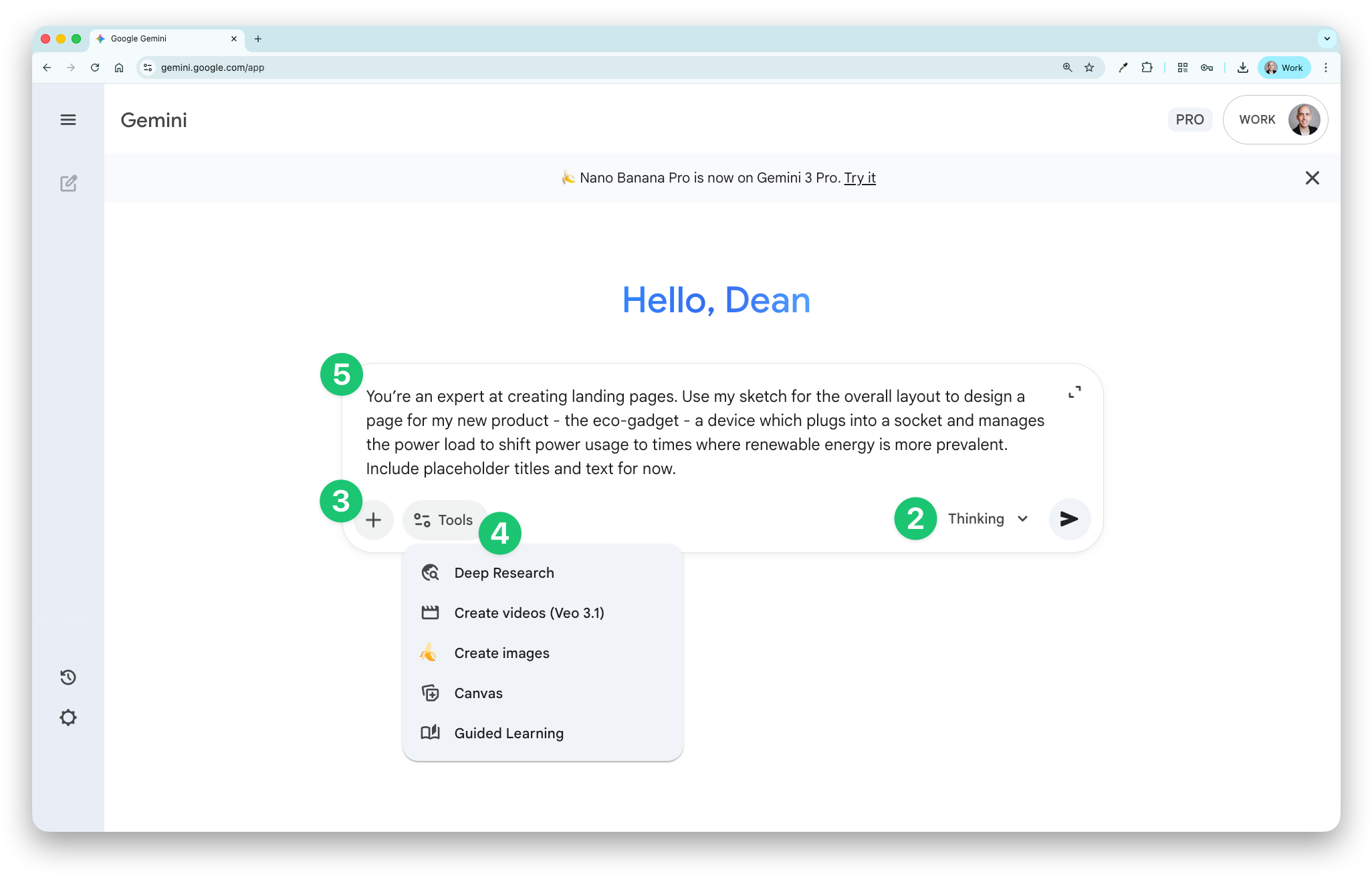
Start a new chat in Gemini
Choose the ‘Thinking’ model
Click the + button and upload a photo of your sketch
Click the ‘Tools’ button and choose ‘Canvas’
Write and submit a prompt to bring it to life. Here are a couple of examples:
You’re an expert at creating landing pages. Use my sketch for the overall layout to design a page for my new product - [insert some details about the product]. Include placeholder titles and text for now.
Act as a software engineer to create an app using HTML and CSS. The app [explain the functionality]. Use my sketch as the layout for the design.
From there, you can go back and forth with Gemini to make tweaks. Gemini looks at images to understand the content in detail. That means it can read handwriting (which I covered before), see colours, and describe the layout.
What will you create from a sketch?
See you next week!
Dean